Affiliate links on Android Authority may earn us a commission. Learn more.
Android Canary 2611 hides an iPhone-style scroll-to-top shortcut, and we got it working

Nov 24, 2026 — 6:50 AM ET



- Android Canary 2611 contains code for a system-wide scroll-to-top feature, similar to tapping the status bar on an iPhone.
- We managed to activate the feature ahead of its release. It worked in Settings and Gmail but not in apps built with Jetpack Compose, like the Play Store.
- Google hasn’t built the exact gesture for it or announced the feature yet, but AndroidX is already being updated to support it. Dormant code for the feature has also appeared in Samsung’s One UI 9.5 Beta 1 for the Galaxy S26 Ultra.
Android phones handle system navigation much better than iPhones, in my opinion, but there’s still one area where iOS manages to eke past Android. If you’ve ever scrolled down a long list on Android, you’d notice you have to scroll or quick-flick your way back to the top. It’s a small gesture you probably don’t think much about, but on iPhones, you can simply tap the status bar to quickly glide straight back to the top. If you’ve ever wished Android could do the same, Google might just be answering your prayers with the new scroll-to-top feature. It’s the latest in a string of iPhone-style conveniences Google is working on, after Android Fast Switch, its apparent answer to Handoff.
APK teardown
This reporting is based on work-in-progress code. These features may not ship.
On iPhones, a quick single tap on the status bar will bring you back to the top of the scroll list. Apple’s developer documentation calls it scrollsToTop, and this gesture works across most iOS apps unless the developer has explicitly turned it off. You can check out the gesture in action in the video below, scrolling through a long app list in the iOS Settings app:
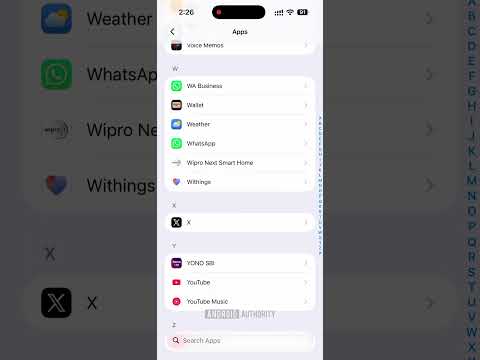
Android has never had a system-wide scrollsToTop equivalent. Some apps let you scroll to the top when you tap their current tab again, and some phone makers have tried their own shortcuts, but on a Pixel, you’re mostly left flicking your way back up a long list. Third-party apps have tried to fill the gap with accessibility services or root, but that’s not an ideal solution for most users.
Google now appears to be fixing this at the platform level. We spotted code for a system-wide scroll-to-top feature in the latest Android Canary 2611 build, and we managed to get it working for a quick look.
Android is getting a built-in scroll-to-top feature
Android Canary 2611 includes code in the Android framework that enables a system-wide scroll-to-top gesture:
Enable scroll to top feature.From the code, it seems the Android OS can send a scroll-to-top command to an app’s window. Android’s standard scrolling views (ScrollView, ListView-style lists, and RecyclerView) can each opt in or out of handling the gesture.
dispatchScrollToTop
onScrollToTop
setScrollToTopEnabled
isScrollToTopEnabled
ScrollView_isScrollToTopEnabled
AbsListView_isScrollToTopEnabled
RecyclerView_isScrollToTopEnabled
Google’s AndroidX libraries, which app developers use to build their interfaces, are getting ready too. In the public source code, NestedScrollView now handles system-level scroll-to-top events and scrolls smoothly to the top when one arrives. It’s on by default, so many apps should support the feature with little effort from app developers.
We got scroll-to-top working on a Pixel ahead of its release
Even in Android Canary 2611, there’s no user-facing way to trigger the gesture yet, so we used root to link status bar taps to the hidden scroll-to-top command on our Pixel 9 Pro XL. The results were mixed.
Within several parts of the Settings app, like the main landing page and Developer Options, the screen glides smoothly back to the top when the status bar is tapped, as you can see in the demo video below:
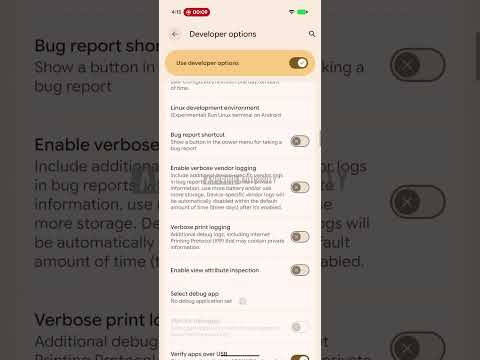
The scroll-to-top feature worked even in apps like Gmail (in its main inbox view). If you have apps open in split screen, sending the command for the feature scrolls only the app we targeted (the top one in our test) back up, while the app in the other half stays put.
However, the feature did not work in a few other apps that we tested. The Google Play Store, Google Wallet, and even the “All apps” list in Settings did not respond to the gesture. This is potentially because these screens are built with Jetpack Compose, which doesn’t appear to support the gesture yet. More confusingly, in Chrome, when trying to jump to the top of a long web page with this gesture, the toolbar slid back into view, but the web page itself did not move. Such hit-and-miss behavior isn’t surprising for an unfinished feature, and more work may be needed by either Google or app developers to properly adopt the feature.
How will you trigger scroll-to-top?
There’s a chance Google ends up wiring the gesture differently, perhaps to respond to a touch on one end of the status bar, or somewhere else. In its current implementation, “scrolling to the top” is live, and the same code references the status bar. However, we had to build and activate the trigger mechanism based on reasonable guesses, with fair inspiration from how Apple does it on iPhones. The final implementation could look a little different depending on how much of Apple Google wants to copy. Still, if recent history is any indication, it will probably be quite similar to tapping once anywhere on the status bar to scroll back to the top.
The scroll-to-top feature lives in Android itself, so other phone makers will likely be able to adopt it too. Samsung’s One UI 9.5 Beta 1 for the Galaxy S26 Ultra already includes code for it, but as expected, it doesn’t work on that device right now either.
Google hasn’t announced a system-wide scroll-to-top feature, and features spotted in Canary builds aren’t guaranteed to ship. Given the work already in Android and AndroidX, though, a tap-to-top shortcut on Pixels looks likely to arrive in a future Android release. We’ll keep you updated when we learn more.
Conversation
Read what readers said or add your take.