Affiliate links on Android Authority may earn us a commission. Learn more.
Chrome can now pull autofill suggestions straight from Gmail
Oct 28, 2026 — 1:00 PM ET



- Google is rolling out Gemini-powered enhanced autofill in Chrome, allowing it to suggest information pulled directly from Gmail.
- The feature can surface order numbers, package tracking details, and flight bookings when filling out online forms.
- It’s rolling out in the US on desktop, Android, and iOS for users with Gemini in Chrome and Personal Intelligence enabled.
Google Chrome’s autofill is getting eager to help you out — a little too eager, if you ask us. Earlier this year, the tech giant started testing a feature that would let Gemini fill out forms in Chrome with information from across your Google account. Now, the company is bringing a more stable version of that functionality to a lot more users.
For reference, when we reported on the development earlier this year, the autofill update was limited to Chrome Canary. Fast-forward to today, and it’s rolling out to all Gemini Personal Intelligence users in the US.
Autofill has always been a reliable Chrome companion, but it has largely been limited to handling the basics, like your name, address, and credit card number. With Gemini and Personal Intelligence now in the mix, the feature can finally tap into your Gmail account to pull relevant information when you’re filling out online forms.
Would you let Chrome's Gemini-powered autofill access your Gmail?
Note that in its initial Canary implementation, the feature could pull information from Gmail, Google Photos, and “other connected apps.” In its current stable implementation, enhanced autofill appears to be limited to Gmail.
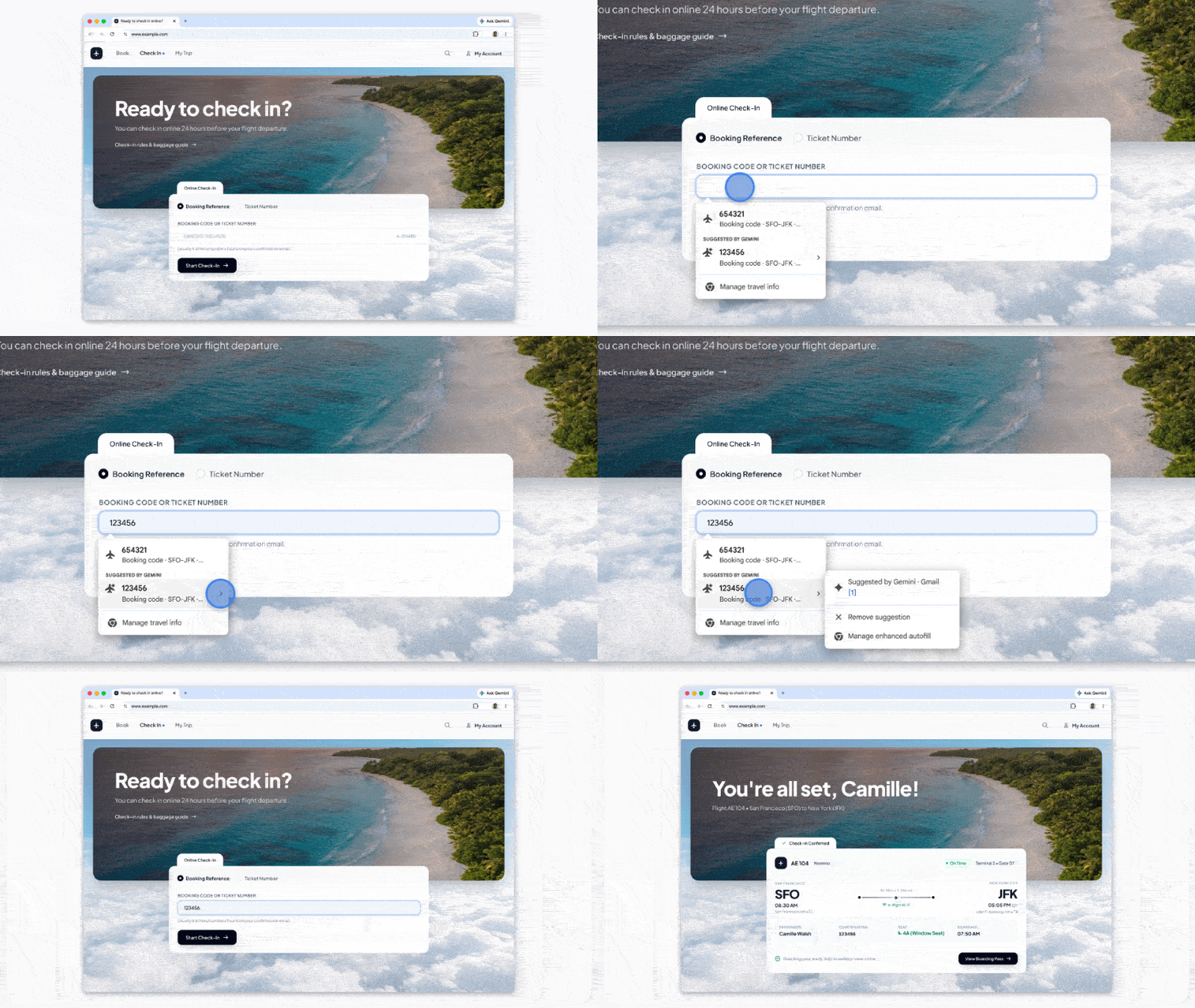
According to Google, the enhanced experience will surface order numbers, package tracking details, and flight bookings directly from Gmail whenever you need them. So, next time you’re trying to check in online for an upcoming flight, you won’t have to dig through your inbox to find your booking code or ticket number, as shown in the short GIF above.
Similarly, if you’re trying to track down a FedEx package, the feature would be able to autofill relevant tracking numbers for you.
Whenever you tap on a text field and a suggestion is available, it will appear under a Suggested by Gemini section. Tapping the suggestion, as seen in the example above, highlights its source. This suggests that the feature could extend beyond Gmail. Lastly, this is also where you’ll be able to remove the suggestion in question or jump right into Chrome’s enhanced autofill settings to manage the feature.
Of course, this level of convenience comes with privacy concerns, especially considering how much sensitive information our inboxes tend to store. And those concerns aren’t even unfounded. Just last week, we reported on an updated Google policy that states the company can use data shared through Personal Intelligence to personalize ads displayed to you.
That doesn’t necessarily mean the enhanced autofill feature will leverage your Gmail data for targeted ads, but it sure does raise questions. The company, for its part, said all your sensitive Gmail data accessed by autofill remains encrypted. Plus, you get to decide whether to enable the feature and what it “can access via your Chrome settings.”
Google didn’t offer a look at how these privacy controls work, and since the feature hasn’t landed for us just yet, we haven’t been able to explore them either.
We’ll have to wait until the feature becomes available to get a clearer picture of exactly how much control users have over the feature. Enhanced autofill is now rolling out to Personal Intelligence users in the US on desktop, Android, and iOS.
Conversation
Read what readers said or add your take.