Affiliate links on Android Authority may earn us a commission. Learn more.
The Galaxy Z Fold 8 has a camera problem, and it has nothing to do with photo quality
Aug 25, 2026 — 5:30 AM ET



I’ve spent years trying the latest book-style foldables, but none earned a permanent spot in my pocket once I finished testing them. Samsung’s Galaxy Z Fold 7 came the closest with a thin-and-light design and truly flagship specs. Unfortunately, it suffered from the same problems as every other folding phone with a squarish inner screen aspect ratio.
The form factor isn’t conducive to widescreen video content, as you’ll see large black bars at the top and bottom of the folding screen. Samsung built the wide Galaxy Z Fold 8 to specifically address this pain point, and it quickly won me over. Then, something happened that I didn’t expect. I found myself using the Galaxy Z Fold 8 unfolded in portrait orientation more than landscape.
It’s my favorite way to read, scroll, and type on a foldable — until the selfie camera gets in the way. And it’s so annoying that I wish Samsung would’ve left the camera out altogether.
Do you use the selfie camera on your foldable's inner screen?
I bought the Fold 8 for landscape, but fell in love with portrait

Book-style folding phones like the Galaxy Z Fold 8 Ultra are superb for split-screen multitasking and document editing. The folding display’s nearly 1:1 (square) aspect ratio is perfect for spreadsheets, slide decks, and project management boards. I rarely use my foldables for work and didn’t find the utility of their main screens to be much use. I preferred to use the cover screen or the main screen’s Flex Mode, since both are better suited for vertical and widescreen content than the folding display as a whole.
The wide Galaxy Z Fold 8 has a 4:3 aspect ratio. It doesn’t completely eliminate black bars, unless you’re viewing old TV shows or playing retro video games. Still, the Galaxy Z Fold 8’s 7.6-inch folding display handles standard 16:9 videos better than any other foldable I’ve used. I tried it on a long cross-country flight to catch up on my favorite Paramount Plus dramas, and the wide foldable finally upgraded the viewing experience compared to using a traditional slab phone. I didn’t feel like I was missing out using my Galaxy Z Fold 8 instead of the in-flight entertainment screen or a tablet.
The surprise came when I unfolded the Galaxy Z Fold 8 and rotated it 90 degrees.
Before I tried the Galaxy Z Fold 8 for myself, I assumed that the foldable’s widescreen prowess came at the expense of its portrait mode and its ability to display vertical content. My initial assumptions weren’t completely wrong, as the Galaxy Z Fold 8’s 5.5-inch cover screen is short and stout, with a 10:16 aspect ratio. It’s not great for watching TikTok, scrolling Instagram, or reading articles.
The surprise came when I unfolded the Galaxy Z Fold 8 and rotated it 90 degrees. Rotating a squarish foldable like the Galaxy Z Fold 8 Ultra doesn’t change much, but rotating the Galaxy Z Fold 8 gave me a portrait mode worth using.

The Galaxy Z Fold 8’s unfolded display looks and feels similar to the iPad mini’s screen, just a bit smaller. If you’ve used an iPad before — most models use a 4:3 aspect ratio — you know what to expect from the Galaxy Z Fold 8. It’s a versatile screen that plays nice with widescreen video in landscape mode and handles vertical feeds well in portrait mode. As someone who spends way too much time reading the news and scrolling Threads or X, I got into the habit of opening my Galaxy Z Fold 8 and using it in portrait mode instead of sticking with the cover screen.
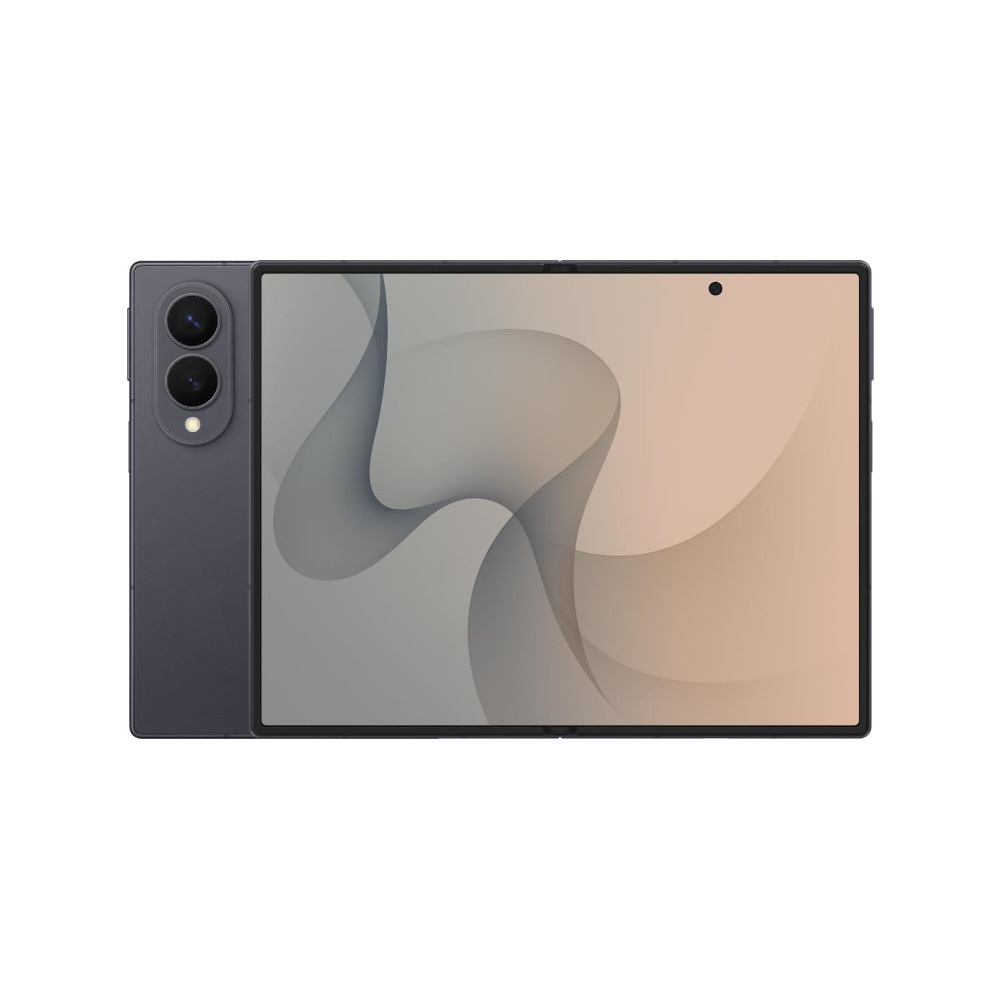
It’s nice to have a foldable with a main screen that excels at playing movies and TV shows, but I don’t watch them on my phone daily. It’s more important that the Galaxy Z Fold 8’s portrait mode is better for daily smartphone tasks. Samsung might’ve accidentally made a foldable with a great portrait mode, though. The placement of the Galaxy Z Fold 8’s front-facing camera on the main display makes no sense when the foldable is rotated.
It’s a shame, because the unfolded Galaxy Z Fold 8 would’ve been perfect if it had a selfie camera in a sensible spot.
One thing holds the Galaxy Z Fold 8’s portrait mode back

Before upgrading to the Galaxy Z Fold 8, the Galaxy Z Fold 4 was the last Samsung foldable I purchased. It may sound hard to believe, but there’s something great about the Galaxy Z Fold 4 that newer Samsung foldables can’t match: it has an under-display selfie camera for the folding screen, whereas the Galaxy Z Fold 7 and newer models use a hole-punch selfie camera cutout. The Galaxy Z Fold 8’s folding display has a 10MP selfie camera that’s much sharper than the 4MP under-display camera (UDC) in my old Galaxy Z Fold 4. You can still see the UDC on the Galaxy Z Fold 4 if you’re looking for it, but it doesn’t distract from the content that’s on your screen.
Google and Motorola foldables position the hole-punch selfie camera in the top-right corner of the folding display. It’s mostly out of sight and out of mind. The only thing the selfie camera really obstructs is the Android status bar, and on a foldable, there’s plenty of room to spread everything out. Sort of like the folding display crease, a hole-punch selfie camera in the corner becomes something you quickly forget about. Samsung chose to put its selfie camera cutout in the top-middle of the right side of the Galaxy Z Fold 8’s folding display, ensuring you’ll rarely stop noticing it.

The cutout is completely hidden when watching 16:9 video content on the Galaxy Z Fold 8 because the black bars extend deeper into the display than the selfie camera. That’s about the only time it is entirely forgettable. The odd placement means you’ll notice it while casually using the Galaxy Z Fold 8 in landscape mode, but it’s most intrusive in portrait mode. While reading an article or scrolling through a social media site, the selfie camera cutout intrudes on the area of the screen displaying your content.

The front-facing camera blocks parts of words, photos, and videos in portrait mode. It’s not a dealbreaker, and I’ll continue to use my Galaxy Z Fold 8 in this orientation despite the inconveniences. The decision puzzles me, since there are two easy ways to solve this issue. Samsung could’ve used an under-display camera, as it did on the Galaxy Z Fold 3 and continued to do on the Galaxy Z Fold 6. It also could’ve stashed the cutout away in the corner, as Motorola and Google did on the Razr Fold and Pixel 11 Pro Fold.
We criticized the selfie camera cutout placement when it was first introduced on the Galaxy Z Fold 7, but it’s actually worse on the Galaxy Z Fold 8. The Galaxy Z Fold 7 and Galaxy Z Fold 8 Ultra’s nearly square aspect ratios create little reason to rotate the devices, so the hole punch is always on top. The Galaxy Z Fold 8’s 4:3 main screen aspect ratio best displays vertical content in portrait orientation. If you rotate it, that selfie camera cutout floats in the top-half of the screen near the side rail — right where it can obstruct your screen’s contents.
If I’m being honest, I don’t want Samsung to bring back the UDC or stuff the selfie camera in the corner. I want Samsung to get rid of it entirely.
Do we really need a selfie camera for the folding screen?

I’ve used book-style foldables since the Galaxy Z Fold 4, and I can’t think of a single time I’ve used the front-facing camera on the main display of a folding phone. If I want to take a selfie, I’ll unfold the phone and use the rear cameras as a selfie camera with the cover display. The quality is better than either front-facing camera, and the phone is easier to hold that way. I assume the folding display’s selfie camera is there for video calls and virtual meetings, but I always end up using the cover display and its front-facing camera for those.
In theory, a selfie camera on the Galaxy Z Fold 8’s main screen could make sense for video calls when the device is half-open on a table. But the Galaxy Z Fold 8 doesn’t support Flex Mode, and its springier hinge won’t let it stay half-open like other foldables. Plus, if this was Samsung’s intended use case, the selfie camera should’ve been positioned near the top of the display in portrait mode, not on the side.
All the Galaxy Z Fold 8's folding display selfie camera does is intrude on screen space, and I'm ready to give it up.
The main perk of a folding display is having more space for your content, and a selfie camera simply gets in the way. Whether it’s a hole-punch camera cutout or an under-display camera, having a selfie camera on a foldable’s main display takes away from the experience of using it. I can’t think of a single situation where I’d want to use the inner screen’s selfie camera over the other cameras onboard, so what’s the point? It becomes a waste of space — space that could be better used for an immersive display or a larger battery, for starters.
As I’ve used the Galaxy Z Fold 8, I haven’t been frustrated by the rear dual-camera system that has one fewer lens than the Galaxy Z Fold 8 Ultra. I’m frustrated that the Galaxy Z Fold 8 has one camera lens too many. All the Galaxy Z Fold 8’s folding display selfie camera does is intrude on screen space, and I’m ready to give it up.
Thank you for being part of our community. Read our Comment Policy before posting.