Affiliate links on Android Authority may earn us a commission. Learn more.
Google Photos could finally learn to do your photo chores
Nov 4, 2026 — 6:13 AM ET


- Google Photos v8.0 contains code for an upgraded Ask Photos feature that can carry out tasks.
- We got it to find, enhance, and add photos to a new album from a single request. Ask Photos showed each step as it works, checked before saving anything, and then suggested follow-ups like sharing the album or making a collage.
- Google Photos’ Ask Photos could also get a new collapsible overlay, and shortcuts to Photos tools and sections. Google hasn’t announced these changes yet.
Google Photos packs a couple of AI features, but one of its primary ones, Ask Photos, largely functions as a glorified conversational search bar. Ask Photos lets you use natural language to ask complex questions about your library. You’d think it would help you organize your messy library, but it stops short after locating specific photos and videos, and that’s about it. That could soon change, as Ask Photos appears to be getting one of its biggest upgrades yet, one that could turn it into a full-fledged task engine, complete with a new overlay interface similar to Gemini’s.
You’re reading an Authority Insights story. Authority Insights brings you all the latest exclusive reports, app teardowns, leaks, and in-depth tech coverage from the Android Authority team that you won’t find anywhere else.
Google Photos v8.0 contains a bunch of new code that references a redesigned conversational interface. Instead of just answering questions about your photos, the new conversational overlay will invite users to “Search or start a task” and prompts: “What can I answer or help you get done today?”
<string name="photos_ellmann_chat_ui_ask_or_search">Search or start a task</string>
<string name="photos_ellmann_chat_ui_starter_lets_get_started_personalized">Let’s get started, %1$s. How can I help?</string>
<string name="photos_ellmann_chat_ui_starter_what_can_i_answer">What can I answer or help you get done today?</string>
<string name="photos_ellmann_chat_ui_starter_what_to_do_today_personalized">What do you want to do today, %1$s?</string>
There are also distinct labels for “Ask,” “Task,” and “Automations,” which suggests Google may distinguish between conversational queries and requests that involve performing actions.
<string name="photos_ellmann_chat_ui_ask">Ask</string>
<string name="photos_ellmann_chat_ui_task">Task</string>
<string name="photos_ellmann_automations">Automations</string>
“Ask” appears to be in line with what Ask Photos already does. “Task,” on the other hand, could cover actions, including bulk ones like deleting and archiving photos.
We asked Ask Photos to do our photo chores
We managed to activate the new experience in Google Photos v8.0 and put it to the test. We asked Ask Photos to “Show me two pictures of my dog, enhance them and add them to a new album called ‘lucyyy'” in a single request.
Here’s the whole flow in action:
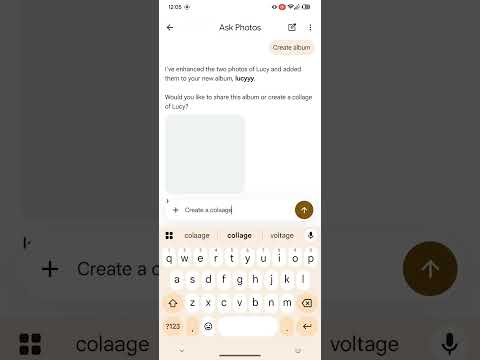
Ask Photos figured out that the dog in question was Lucy and searched for her photos, showing each step as it went: “Searching for ‘Photos of Lucy,'” “Reviewing 200 search results,” and “Editing photo.” It then enhanced two photos and asked us to check them, with buttons to “Save all” or “Edit selection” to keep only the ones we liked. Once we confirmed, it created the album and asked whether we’d like to share it or create a collage of Lucy.
We picked the collage, and Ask Photos generated three collage options from the two enhanced photos. Tapping “Save all” saved all three, after which it offered to add them to the album as well.
For those keeping track, Ask Photos managed a search, an edit, an album creation, and a collage creation, all without leaving the conversation. As you can see, Ask Photos also did not act on its own: it paused for approval before saving or creating anything.
Ask Photos could also tap into your favorite Google Photos tools
Beyond complex chained requests, Ask Photos (codenamed “ellmann”) could potentially surface contextual action chips that tap into existing Google Photos tools, like creating an album, collage, GIF, or cinematic photo, erasing distractions, finding related photos, or making a highlight video:
<string name="photos_ellmann_contextual_selection_cinematic_photo">Create a cinematic photo</string>
<string name="photos_ellmann_contextual_selection_collage">Create a collage</string>
<string name="photos_ellmann_contextual_selection_create_album">Create an album</string>
<string name="photos_ellmann_contextual_selection_erase_distractions">Erase distractions</string>
<string name="photos_ellmann_contextual_selection_find_related_photos">Find related photos</string>
<string name="photos_ellmann_contextual_selection_gif">Create a GIF</string>
<string name="photos_ellmann_contextual_selection_highlight_video">Make a highlight video</string>
<string name="photos_ellmann_contextual_selection_tell_me_more">Tell me more</string>
<string name="photos_ellmann_contextual_selection_video_maker">Make a video</string>
These chips will likely show up right above the overlay when you attach a photo. When we tapped “Create a cinematic photo,” Ask Photos generated three cinematic previews, again letting us save all of them or pick our favorites.
Ask Photos could potentially also double up as a shortcut to different parts of Google Photos, jumping straight to Favorites, Archive, Recently added, Screenshots, Map View, and Trash, or opening Video Maker directly.
<string name="photos_ellmann_chat_turn_tool_navigation_archive">Archive</string>
<string name="photos_ellmann_chat_turn_tool_navigation_favorites">Favorites</string>
<string name="photos_ellmann_chat_turn_tool_navigation_map_view">Map View</string>
<string name="photos_ellmann_chat_turn_tool_navigation_recently_added">Recently added</string>
<string name="photos_ellmann_chat_turn_tool_navigation_screenshots">Screenshots</string>
<string name="photos_ellmann_chat_turn_tool_navigation_trash">Trash</string>
<string name="photos_ellmann_chat_turn_tool_videomaker_open_video_maker">Open video maker</string>
Ask Photos could get a new Gemini-like overlay
Circling back to the overlay, all of these new features could live in a new overlay that sits at the bottom of the Google Photos app, much like the Gemini overlay on Android. Suggested prompts like “Create an album of my best portraits” and “Suggest old receipts I could delete” stack up right above it, along with a row of people and pets to quickly pick from. When you attach a photo, the suggestions could switch to contextual actions for that photo instead.
Users will likely be able to collapse the overlay or drag it up to expand into a full-screen chat.
Your conversations will likely also stick around until you start a new chat, which is how Ask Photos kept track of Lucy’s album and collage across our requests.
<string name="photos_ellmann_chat_ui_drag_handle_collapsed_state">Collapsed</string>
<string name="photos_ellmann_chat_ui_drag_handle_expand_conversation">Expand conversation</string>
<string name="photos_ellmann_chat_ui_new_chat_dialog_title">Start a new chat?</string>
<string name="photos_ellmann_chat_ui_new_chat_dialog_body">This will clear your conversation history</string>
<string name="photos_ellmann_chat_ui_people_suggestion_see_all">See all people & pets</string>What could Automations do?
The Automations entry is the most intriguing of the lot. Google already lets Gemini handle multi-step Google Photos workflows, including recurring tasks that run in the background, like creating monthly highlight albums. Given that Ask Photos can now chain tasks like the ones we tested, a dedicated Automations section could bring similar recurring workflows directly into Google Photos.
<string name="photos_ellmann_automations">Automations</string>However, the strings don’t reveal how Automations would work, and tapping on the option currently crashes the app. We’ll have to wait for Google to flesh it out before we can see what it does.
Google hasn’t announced any of these upgrades yet, but based on what we’ve seen, Ask Photos could finally become the photo assistant it was always meant to be. We’ll keep you updated when we learn more.
Conversation
Read what readers said or add your take.