Affiliate links on Android Authority may earn us a commission. Learn more.
I lost my keys twice to test the Pixel Tag: It aced downtown but struggled on a quiet trail
Nov 10, 2026 — 12:00 PM ET
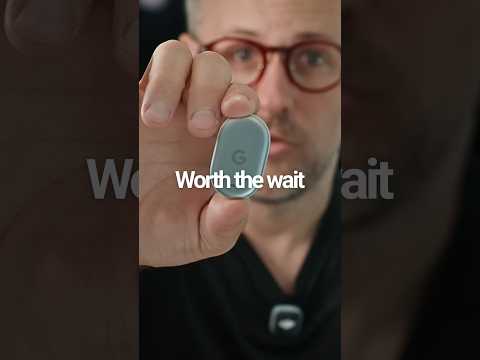


Google’s Pixel Tag is finally going on sale, three months after it debuted alongside the Pixel 11 series. It’s the company’s own answer to Apple’s AirTag, and like the AirTag, it leans on a huge crowdsourced network to help you find whatever you attach it to. In this case, that’s Google’s Find Hub network, which the company says spans over a billion Android devices.
I’ve been testing the Pixel Tag with my Pixel 11 Pro, and rather than just pinging it around the house, I deliberately lost my keys twice: once on a busy downtown street and once at a quiet, wooded trailhead. Here’s how it held up, and what you should know before you buy one.
Will you buy the Google Pixel Tag?
Losing my keys on a busy downtown street

For my first test, I recreated a common scenario: dropping your keys without noticing while out on a bike ride. Riding through a busy downtown area, I tossed my keys into a dense roadside bush and kept going to my local coffee shop. By the time I’d arrived and ordered my drink, less than five minutes after the drop, my phone had already pushed a “keys left behind” alert to my lock screen. I opened the Find Hub app and used the map to head back toward the area.
The map got me to the right area, but the pin was a fair distance from the bush itself. Tapping Play sound didn’t work at first, because I was still out of Bluetooth range. I knew where my keys were, of course, but if I hadn’t, I’d have needed to walk around holding my phone out until it picked up the tag, which could have taken a while.
Once I was about 30-40 feet away, though, my phone connected quickly and the UWB Precision Finding screen took over. It guided me to the exact spot in the bush where I’d left my keys.
Hiding my keys at a quiet trailhead

My second test was much trickier. I handed my keys to my partner, Alison, and asked her to hide them without telling me where. She chose a local trailhead: a heavily wooded area with little foot traffic. With few passing Android phones to report the tag’s location to the network, the tracking data was far less useful.
The last location Find Hub recorded was in a neighborhood near the trailhead. I knew Alison wouldn’t have hidden my keys in a stranger’s yard, and since the trailhead was so close, I guessed (correctly) that they were there. However, after wandering through the woods for a while without picking up a signal, I eventually had to ask Alison for the general area. Once I got close enough for my phone to connect to the tag over Bluetooth, UWB tracking worked well again and pinpointed my keys at the base of a mossy tree.
The Pixel Tag is reliable in busy areas, but on a quiet trail, you may not find it until you're back within Bluetooth range.
That’s the big takeaway from my testing. The Pixel Tag works well in populated areas, where plenty of Android phones pass by to update its location. If you lose something on a remote hiking trail or a quiet rural road, though, you might not find it until you physically get back within Bluetooth range of the tag, or until someone with an Android phone happens to walk past.
Finding nearby items with UWB, chimes, and a hidden button
Once your item is within Bluetooth range, the Find nearby option becomes available in Find Hub. Newer Android phones can use Bluetooth Channel Sounding to give more accurate distance readouts from farther away, and as you get closer, Ultra Wideband (UWB) kicks in on supported phones to show an arrow pointing the way. It’s the Pixel Tag’s standout feature, but it needs a phone with UWB, and Google has previously left some UWB-equipped Pixels out of Precision Finding, so check that your phone supports it before you count on it.
If the tag is buried in couch cushions, tap Play sound in the app to make it chime. You need to be fairly close for this to work from your phone, but you can trigger the chime from anywhere if the tag is near another device signed in to the same Google Account, such as a Google Home speaker.
It works the other way around, too. If your keys are tagged but you’ve misplaced your phone, double-press the Pixel Tag’s button to make your phone ring. Press the button once, or unlock your phone and press the power button, to stop it. Just don’t expect to find that button by feel. It’s completely flush with the tag’s body, and I’d have missed it entirely if I didn’t know it was there.
Setup, design, and battery

Setup is painless. The Pixel Tag works with phones running Android 9 or later, and a Fast Pair prompt popped up on my Pixel as soon as I unboxed it. It took less than two minutes to get it into the Find Hub app and ready to go.
The design is simple and understated. The Pixel Tag currently comes in a single pale green colorway called Fog, which you might recognize from the Pixel 11 Pro. At just 5.4mm thick, it slides easily into a wallet or onto a keyring without adding much bulk. It’s also IP67-rated, so it’s dust-tight and can survive being submerged in up to one meter of water for up to 30 minutes. Inside, you’ll find Bluetooth 6.0, UWB, NFC, a speaker, and an accelerometer.
The Pixel Tag doesn't come with any accessories, so you'll need a case or holder for whatever you plan to attach it to.
You have to plan ahead for how you’ll carry it, though. The Pixel Tag doesn’t come with any accessories, so you’ll need a case or holder for whatever you plan to attach it to. Google sent me the Bellroy Leather Pixel Tag Case, which is very nice, but it’s an extra purchase.
The tag runs on a standard CR2032 coin-cell battery that you can swap without any tools. Press down on the back, twist the cover counterclockwise by hand to pop out the old cell, drop in a new one, and twist the cover clockwise to seal it. Google says a battery should last over a year. I haven’t had the tag long enough to confirm that, but Find Hub will notify you every two weeks once the battery is running low, so it shouldn’t catch you off guard.
Sharing, privacy, and anti-stalking protections
You can share a Pixel Tag with someone else so you can both track the item in your own Find Hub apps. The recipient has 24 hours to accept the sharing link, and once they do, they can track the item without triggering unwanted tracking alerts. Shared users can’t use the phone-ringing trick (which makes sense, as the tag wouldn’t know which phone to ring) or the Notify when left behind alert, though.
If you’ve lost something and want to temporarily share its location, for example with an airline that has misplaced your luggage, you can generate a Share item location link. To protect your privacy, it expires after seven days or as soon as you’re reunited with your Pixel Tag.
All network location data is end-to-end encrypted.
A few other extras round things out. Tapping your phone against the tag’s side, just below the battery cover, uses NFC to open its details page in Find Hub, and someone who finds your lost tag can tap it to reach you. If you wear a Wear OS watch, the Find Hub app there lets you see the tag on a map, get directions, or ring it from your wrist.
On privacy, Google says all network location data is end-to-end encrypted, so only you and the people you share the tag with can see its location, not even Google. The Pixel Tag also supports the industry-standard Detecting Unwanted Location Trackers (DULT) specification, so both Android phones and iPhones will alert someone if an unknown Pixel Tag that’s separated from its owner is traveling with them. And if the tag’s accelerometer detects movement after it has been away from its owner for an extended period, it will start chiming to alert anyone nearby.
Should you buy the Pixel Tag?

Based on my testing, the Pixel Tag easily justifies its $29.99 price, or $99.99 for a four-pack. The Find Hub integration is seamless, UWB Precision Finding is genuinely helpful when you’re hunting for something, and the tool-free, replaceable CR2032 battery is a big win for longevity.
If you've been waiting for Google's own Find Hub tracker, the Pixel Tag is worth a look.
The single Fog colorway is a bit of a letdown, and tracking in rural areas can be hit-or-miss depending on foot traffic. Keep in mind that Pebblebee, Motorola, and other brands already sell solid Find Hub trackers, so if you already own one that works for you, there’s little reason to switch. If you don’t, though, the Pixel Tag is worth a look. And if you’re not sold, here are five Bluetooth trackers to consider instead.

Conversation
Read what readers said or add your take.