Affiliate links on Android Authority may earn us a commission. Learn more.
I couldn't have been more wrong about the Fitbit Air — here's what changed my mind
Jul 12, 2026 — 6:00 AM ET



There is no doubt that I’m a WHOOP fan. I wrote about why I wouldn’t switch from my WHOOP MG to the Fitbit Air despite its tempting price point. And for about three weeks after the Fitbit Air launched, I stuck with that decision.
But then the tech enthusiast in me got the better of me, and I finally picked up the Fitbit Air in mid-June. Since then, I’ve been using it as my sole fitness tracker.
And, I can’t believe I’m saying this, but using the Fitbit Air has completely changed my mind. Many of the assumptions I had before trying it turned out to be wrong, and it’s impressed me enough that I’m now seriously considering the switch permanently.
Which fitness tracker would you buy today?
Fitbit Air’s design and build make a LOT of difference

One thing about fitness trackers that gets overlooked is how bulky they are. You’ll find plenty of smartwatch reviews covering features, battery life, and apps, but very few actually talk about how a fitness tracker feels on your wrist and the long-term impact that has.
My primary reason for switching to WHOOP is how nonchalant it is. It has a clean look, sits nicely on my wrist, and is significantly lighter than any smartwatch I’ve worn.
To put that in perspective, the Galaxy Watch Ultra, which offers at least somewhat comparable health tracking to a passive fitness tracker, weighs around 61g. That weight may not seem much, but it adds up over time. A heavy tracker on your wrist leads to fatigue, and fatigue leads to that tracker ending up in your bedroom drawer. That’s exactly what happened with every smartwatch I owned.
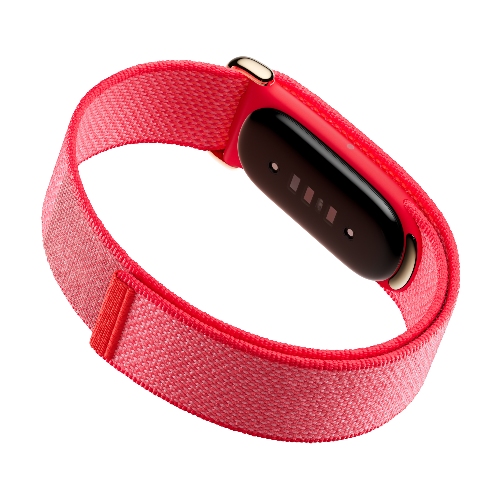
Switching to WHOOP solved that problem for me. But when I first wore the Fitbit Air on my wrist, I immediately noticed was just how much lighter it is. At just 12g, it barely feels like there’s anything on your wrist, and I genuinely think that’s one of its biggest strengths.
It's so light and unobtrusive that I often forget I'm even wearing it, and that's exactly what you want from a passive fitness tracker.
It’s also noticeably smaller than the WHOOP MG. The tracker itself is almost half the size, which makes it even easier to wear throughout the day and while sleeping. That might sound like a small difference, but for a passive fitness tracker, that kind of form factor matters more than most people give it credit for.

And despite being this small and light, the battery life has genuinely surprised me. Google claims up to a week, but I’ve consistently gotten over eight days on a single charge, and that’s with regular workouts and sleep tracking throughout. Battery life isn’t usually something I praise about Google products, so the Fitbit Air has been a pleasant surprise.
Unpopular opinion: I prefer Google Health over the WHOOP app

This is probably my most controversial takeaway after using the Fitbit Air: I actually prefer the Google Health app over the WHOOP app.
Before I go any further, I should point out that I’ve never owned a Fitbit before this. By the time I started using the Fitbit Air, Google had already transitioned everything over to the new Google Health app. So I can’t compare it to the old Fitbit experience. But what I can say is that my experience with the Google Health app over the past few weeks has been absolutely fantastic.
One thing I’ve never really liked about the WHOOP app is how much data it throws at you the moment you open it. Right at the top, you’re greeted with sleep, recovery, and strain scores. Then comes the day view with even more graphs and numbers, followed by another dashboard packed with additional metrics. Yes, WHOOP Coach adds some AI-powered context, but the app still feels very numbers-first.

Google Health takes a completely different approach. If you’re subscribed to Google Health Premium, the app gives you a simple summary of how your day has been. You still get your weekly cardio load, heart rate, sleep, and activity data, but underneath that, Google generates an AI summary that explains what those numbers actually mean. And I find that much more useful than staring at graphs.
The reality is that most people don’t care about every sleep stage or recovery score. They just want to know, “How am I doing?” and I think Google Health answers that question much better. I completely understand that WHOOP is designed for athletes first, but for the average user, the extra AI context gives Google Health a real advantage.
I also like the way Google Health checks in throughout the day. Every few hours, it sends small notifications with insights or reminders based on how things are going. The WHOOP app doesn’t really do that, and I’ve actually found those little nudges from Google Health surprisingly helpful.
Tracking has improved over time, and the price makes the Fitbit Air very hard to ignore

One thing I’ll always give WHOOP credit for is its tracking. Whether it’s sleep or workouts, the WHOOP MG has consistently been one of the most accurate wearables I’ve used. That’s not something I could honestly say about the Fitbit Air when I first got it.
In fact, my first week with it was pretty rough. It occasionally missed sleep sessions altogether, and workout tracking wasn’t particularly reliable either.
But after wearing it for the past three weeks, things have changed quite a bit. It feels like the tracker has finally calibrated to my body, and the overall tracking quality has improved noticeably. At this point, it’s reached the point where I’m struggling to justify paying for a WHOOP subscription every year.
Don’t get me wrong, I still don’t think the Fitbit Air tracks quite as well as the WHOOP MG. WHOOP remains the better fitness tracker overall. But the gap isn’t nearly big enough for me to comfortably justify spending $200 ($360 rather) a year on WHOOP anymore. I’d put Fitbit Air’s tracking firmly in the good enough category, and that’s more than enough for most people.

Of course, the Fitbit Air isn’t just a $99 purchase if you want access to all of its health insights. There’s the Google Health subscription, which costs $10 a month or $100 a year. However, I think it’s still worth paying for, especially since it unlocks the AI nudges and summaries that make the tracker so useful.
And if you’re already paying for Google AI Pro ($20/month) or Google AI Ultra ($100/month or $200/year), Google Health Premium is included at no extra cost. That makes Google’s subscription a much better overall value, since you’re not just getting better health insights, but also access to Gemini’s latest models, higher usage limits, more Google storage, and the other perks that come with those plans.
Affordable price
Excellent sleep tracking
If you’re a serious athlete who depends on detailed strain tracking, recovery metrics, and minute-by-minute workout analysis, WHOOP is probably still worth paying for. But for everyone else, it’s really hard to argue against a $99 Fitbit Air.
Plus, considering how much the tracking has improved in just a few weeks since launch (and the bug fixes that keep on coming), I’m pretty optimistic that I’ll end up switching to it full-time sooner rather than later.
Thank you for being part of our community. Read our Comment Policy before posting.