Affiliate links on Android Authority may earn us a commission. Learn more.

The Kindle Scribe Without Front Light is a powerful notebook that's just not for me
Jul 10, 2026 — 7:00 AM ET
Amazon Kindle Scribe Without Front Light
MSRP: $429.99
What we like
What we don't like
Amazon Kindle Scribe Without Front Light


I’m not shy about my love for notebooks, digital and otherwise. When Amazon announced a Kindle Scribe without a front light, my immediate reaction was intrigue. I might even be the ideal audience. I’m burnt out on traditional screens, and my favorite ways to unwind are reading books and scribbling nonsense. I realize that’s not exactly a high-stakes productivity workflow, but it is an honest one.
On paper (pun intended), a Scribe without a light guide layer should be Amazon’s most paper-like Kindle yet. At launch, Amazon touted a cleaner-looking E-Ink display and a more natural writing experience, plus better battery life and all the same reading and note-taking features as the standard and Colorsoft models. After a month with the device, though, I found myself missing the feature Amazon chose to remove far more than I appreciated the benefits of doing without it.
Premium hardware with a familiar feel

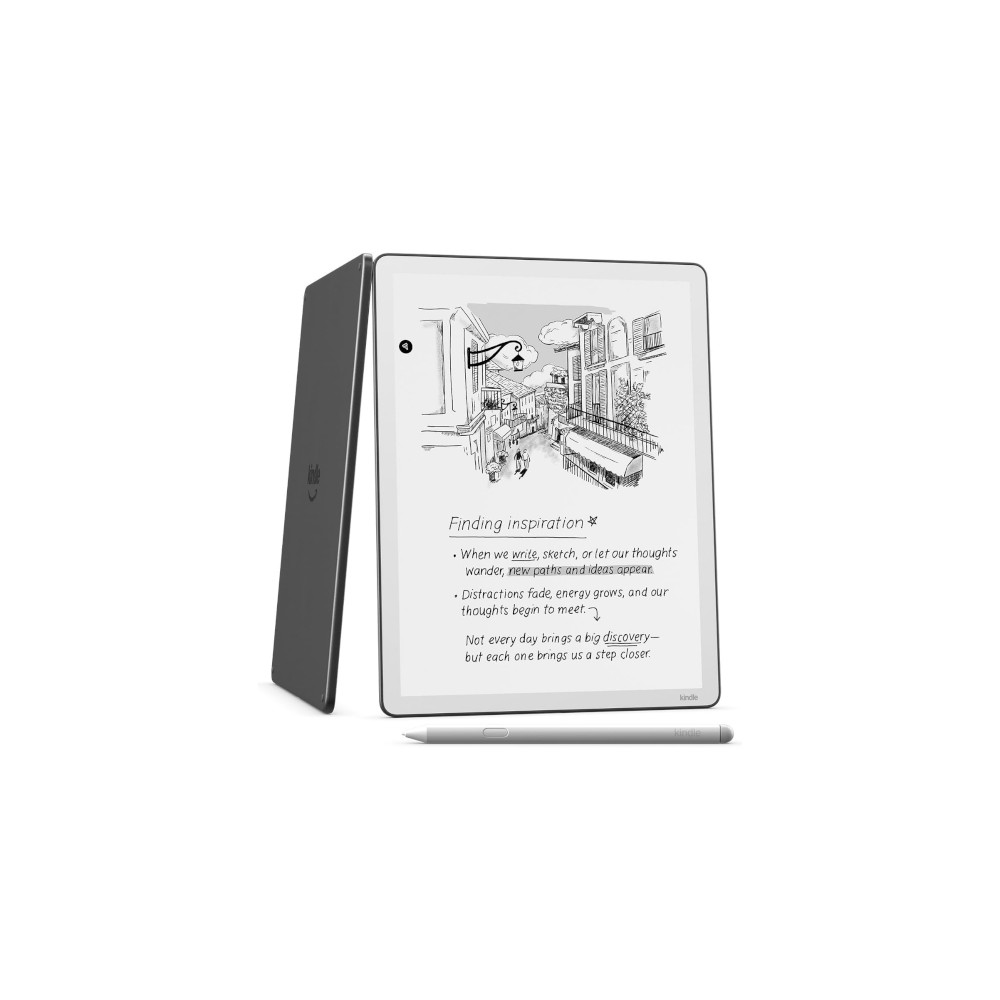
If you’ve used the standard Kindle Scribe or Colorsoft, things will look very familiar. This is largely the same hardware and general build, which is not a bad thing. The aluminum chassis still feels premium without being overly heavy, and at just 400g, it’s a very comfortable device to hold for long sessions. Its thin bezels leave plenty of room to grip the device without accidental touches, and the 11-inch display feels spacious enough that I ran out of things to doodle when testing the pen originally. To be clear, the Scribe did not improve the quality of my doodles, but I appreciate the extra square footage to let them loose.

Like other models in the lineup, it’s a great size for annotating PDFs, taking notes, marking up documents, or reading an especially dense piece of literature. It would not, however, be my go-to Kindle if I just want an e-reader. For casual reading, I still prefer something smaller and easier to hold one-handed.
The Kindle Scribe Without Front Light is a great size for sketching and note-taking, and the included stylus continues to be one of my favorites.
If, however, you’re fully bought in on the digital notebook trend, the Scribe’s included stylus continues to be one of my favorites. It magnetically attaches to the side of the device and features both a built-in eraser and a customizable shortcut button. Writing feels responsive, and palm rejection is reliable. My handwriting is still trash, and my dinosaurs look like chicken nuggets, but at least erasing doesn’t spread gross little pink remnants all over the place.

Where my expectations and reality started to diverge was with the display itself. Removing the front light should, in theory, make writing feel more authentic by eliminating the light guide layer between the pen tip and the panel. I expected a more paper-like experience and slightly darker text. Instead, I honestly couldn’t tell much of a difference. If the writing experience improved, it wasn’t enough for me to notice in daily use.
I expected a more paper-like experience and slightly darker text, but I couldn’t tell much of a difference.
What I did notice was that the display simply felt dimmer. Obviously, a device without a front light won’t be as bright as one with adjustable LEDs, but I was surprised by how often it looked duller than an actual sheet of paper sitting next to it. Real paper reflects whatever light is available, but the Kindle Scribe display feels like it needs much more ambient light to look its best. Maybe I’m just brainwashed by constant screen exposure, or maybe I’m subconsciously bitter about how often my partner tells me to turn my smartphone brightness down, but I found the dull Scribe irksome. Ironically, the feature designed to make the Scribe feel more like paper only exaggerated one of paper’s limitations.
All the Kindle features I already love, and one I missed

Fortunately, Amazon didn’t remove anything besides the front light. The software experience is virtually identical to the standard Kindle Scribe, and that’s great. It combines the familiar Kindle reading experience with robust handwriting tools, expanding AI-powered features, and perks like searchable handwritten notes. Simply put, it’s a very capable digital notebook.
As an e-reader, it also delivers everything I expect from a Kindle. The 300ppi display renders text well, page turns are quick, and I love having access to the Kindle Store, Goodreads integration, Whispersync, and Amazon’s massive library ecosystem. It also packs the same Amazon headaches I’ve been lamenting lately, including ownership concerns, but that’s the deal, with or without a front light.

Unlike Android-powered E Ink tablets, there aren’t dozens of apps competing for my attention, and that focused experience is one of Kindle’s biggest differentiators. When I pick up the Scribe, it is because I want to read, write, annotate, or brainstorm. I am not tempted to check email, open Slack, or wander into a browser tab I never needed. For me, that intentional limitation is a feature.
Battery life is also excellent. Without powering LEDs, Amazon rates this model for even longer endurance than the standard Scribe, and for some shoppers, that might be a real reason to forgo a lighting system. I can honestly say my Kindles have never failed me when it comes to battery life, so I’m not too hyped about adding extra time to an already generous charging schedule. Still, if you travel a ton or generally are not great about power management, it’s a nice upside to grabbing this model.

And yet, for me, the missing front light ultimately defines the experience. I read before bed with the lights off. I edit documents on redeye flights. I review articles early in the morning before everyone else in my house wakes up. In other words, like Batman, I do some of my best work in the darkness. And yet those are exactly the moments when this model becomes noticeably less convenient.
Could I turn on a lamp? Of course. But I love dedicated E-Ink devices because they’re effortless and self-contained. I don’t want to think about the lighting in the room before I pick up a Kindle, just open it and start reading. Or sketching. Or drafting to-do lists.
Amazon Kindle Scribe Without Front Light review verdict: Should you buy it?

I completely understand why Amazon built this version, and there are probably people who will genuinely prefer it. If you mostly work in bright offices, classrooms, studios, or coffee shops, you may not miss the front light at all. You’ll get a clean Scribe display and a little extra cash in your pocket.
Yet, while it’s the cheapest Kindle Scribe in the lineup, the savings aren’t very dramatic compared to the list price of the frontlit model, or even the Colorsoft model ($629.99 at Amazon). I’d rather pay more for the flexibility to use the device anywhere than save a little on a device I reach for less often.
If you’re after even more freedom, the Boox Go 10.3 Gen II ($449.99 at Amazon) also comes with a frontlight and features an Android-based platform for Play Store access. Meanwhile, Kobo offers the Kobo Libra Colour ($249.99 at Amazon) for a more reading-focused device with stylus support. Finally, if you’re just after a notebook and not too pressed for a reader, the Remarkable lineup includes solid options as well, including the ReMarkable Paper Pro ($629 at Amazon).
- Premium, reliable hardware
- Large display for note-taking
- Excellent included stylus
- Distraction-free Kindle experience
- Great battery life
- Cheapest Scribe in the lineup
- No front light is a significant trade-off
- Display often looks dim
- Savings are modest
Thank you for being part of our community. Read our Comment Policy before posting.