Affiliate links on Android Authority may earn us a commission. Learn more.
One UI 9.5 could let you shoot 360-degree panoramas with your front and rear cameras


Nov 19, 2026 — 1:54 AM ET


- Samsung appears to be working on a new camera feature called “Dual cam panorama.”
- It will use the front and rear cameras to capture up to 360 degrees of your surroundings.
- The feature isn’t live yet, but could make an appearance in future One UI 9.5 betas.
The One UI 9.5 beta is finally here, and we’ve been taking a close look under the hood to spot upcoming features that aren’t yet enabled. We’ve already found evidence of a native Open Gate recording function, and it seems Samsung is prepping yet another new feature for the Camera app.
APK teardown
This reporting is based on work-in-progress code. These features may not ship.
We found strings in the One UI 9.5 Camera app code that hint at a new feature called “Dual cam panorama.” The existing Panorama mode captures a wide scene by letting users move their phone in one direction. Dual cam panorama could let users capture a complete 360-degree view of their surroundings by using both the rear and front cameras in tandem.
Check out this animation we found buried in the app’s code:
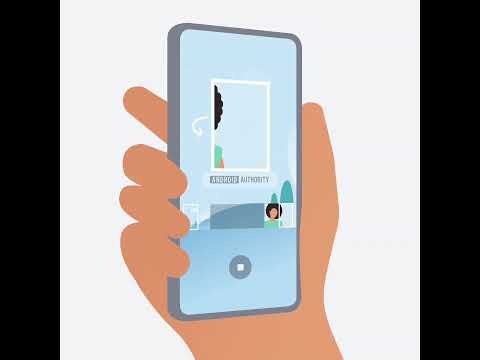
According to the strings we’ve found, the Camera app will ask whether you’re shooting with your left or right hand. After that, you’ll tap the shutter button and follow the on-screen instructions to rotate the phone. Dual cam panorama could be locked to portrait orientation, as the app’s code suggests it will prompt you to rotate your phone if you’re holding it in landscape mode.
There are also hints of a vibration feedback system being prepped to guide you through the panorama capture. Your phone will vibrate once you’ve rotated it far enough, signaling that the capture is complete. Other strings suggest that the capture will be canceled if you rotate your phone the wrong way, and the app might save a partial panorama if you don’t rotate it far enough.
Once the capture is done, the app will process the images into a final “dual cam panorama,” suggesting it stitches together image data from both cameras into a single image.
Here are all the strings we found related to the upcoming “Dual cam panorama” feature:
<string name="smart_tips_dual_panorama_title">Dual cam panorama</string>
<string name="smart_tips_dual_panorama_description">Capture up to 360° of your surroundings with the front and rear cameras. For best results, hold your phone steady and rotate it slowly.</string>
<string name="help_text_dual_panorama">Select the hand you shoot with, then tap the Shutter button to start capturing.</string>
<string name="panorama_grip_left_hand_shot">Left-handed shooting</string>
<string name="panorama_grip_right_hand_shot">Right-handed shooting</string>
<string name="dual_panorama_rotate_to_portrait_guide">Rotate your phone to portrait for Dual cam panorama.</string>
<string name="dual_panorama_rotate_slowly">Slowly rotate your phone to the %s.</string>
<string name="dual_panorama_vibrate_far_enough">Your phone will vibrate when you've gone far enough.</string>
<string name="dual_panorama_capture_wrong_direction">Capture canceled because your phone rotated the wrong way. Try again and continue rotating until your phone vibrates.</string>
<string name="dual_panorama_capture_partially_saved">Your phone didn't rotate far enough, so only part of your panorama was saved.</string>
<string name="dual_panorama_capture_complete">Capture complete. Creating dual cam panorama...</string>
It’s still unclear which Galaxy devices will support the feature. The strings also don’t tell us whether the result will be a standard panoramic image or something you can view in an immersive format, maybe even on an Android XR device. Even so, it could be a neat addition that lets you capture more of your surroundings without any extra equipment.
Conversation
Read what readers said or add your take.