Affiliate links on Android Authority may earn us a commission. Learn more.
After just 5 days, my Pixel 11 Pro is already a brick
Aug 25, 2026 — 6:00 AM ET



The Pixel lineup and hardware woes seem to go hand in hand. Whether it’s OLED tint issues with the Pixel 2 XL, overheating, spontaneously shattering camera glass, or display issues with the Pixel 9 Pro lineup, hardware troubles seem constant. As a day-one Pixel user ever since the first phone launched, I’ve usually been immune to all the troubles that tend to plague Google’s flagship. Well, as the saying goes, luck eventually does run out.
I’ve had my Pixel 11 Pro for just five days, and it’s already a brick. A couple of days into my time with the Pixel 11 Pro (in the gorgeous Canyon colorway), I decided to do a factory reset and a fresh setup instead of copying over all my data from my previous phone, and here we are.
As I write this piece, my Pixel is stuck in a shutdown loop that turns the phone off every few seconds during setup. Let’s just say, my disappointment is immeasurable and my day is ruined.
Have you faced any early software or hardware bugs with Pixel phones?
The setup loop of doom

While my first day with the Pixel 11 Pro was pretty unremarkable, I didn’t really use the phone much because it was still installing and sorting through the hundreds of gigabytes of data I’d copied over. What can I say? I use my flagships as you’re supposed to.
On a lark, I decided to start from scratch instead. And that’s where my tale of doom and gloom begins. For one, the phone just blanked out during the reset process. I figured it was just taking its own sweet time, so I carried on with my other tasks for the day.
A brand new flagship shouldn’t be shutting itself down before you can even finish setting it up.
A few hours later, when I turned my attention back to the Pixel 11 Pro, it was still sitting on a blank screen. Alright, time to set up the phone, I suppose. Well, that’s where things get complicated. While I’d make it to the onboarding screen, whenever I was setting up Wi-Fi or signing in to my Google account, the screen simply went blank, displayed a shutdown message, and, well, the phone shut down.
I’ve obviously checked the obvious and made sure the phone is fully charged. Holding down the power button brought the Google logo back, but the same thing kept happening. The Pixel 11 Pro would let me get through two or three setup screens before shutting down once again.
Safe mode offered some hope

My next step was to try booting in safe mode. Using the standard power and volume button combination, I managed to bypass the normal startup process and speed-skip past the setup screens.
However, that didn’t make much of a difference either. The phone still shut down. The only clue to what might be going on was the overheating message I received during one such startup run. But that sounds more like a glitch than a real possibility, considering I’m in air-conditioned rooms at around 18 degrees Celsius. The Pixel 11 Pro just shuts down again.
I went from basic troubleshooting to ADB and a manual OTA sideload. Nothing worked.
Google’s own support documentation recommends troubleshooting steps for Pixels that shut down or restart unexpectedly, including checking for updates if the problem continues. In my case, however, none of that helped. The phone wouldn’t stay on long enough to complete setup, and even manually installing the latest official software didn’t fix it.
At this point, most users would give up and just call customer support. However, being the nerd that I am, I even tried ADB-based fixes, as basic troubleshooting was clearly not enough at this point. Perhaps this was a case of a bad software flash.
I put the Pixel 11 Pro into recovery mode, connected it to my computer, and started the sideload process for the latest OTA. The update completed without any errors, and yet the issue persists.
That’s when I decided to give up.
It may not be an isolated problem

When a brand-new phone fails, it’s easy to assume you simply got a defective unit. That is probably not enough to warrant a story, as an occasional lemon is just a reality of mass manufacturing. However, a quick look through online communities suggests I may not be the only person dealing with shutdown problems on the Pixel 11 series.
Multiple Pixel owners have reported unexpected shutdowns and setup problems on Reddit and Google Support forums. There are also reports of phones getting unusually warm during setup, although not every Pixel 11 owner appears to be affected.
It’s too early to call this a widespread defect, but there are enough reports to suggest this is not an isolated incident.
That doesn’t necessarily mean there’s a widespread hardware defect. There just isn’t enough information yet to say what is causing the problem. It could be a software bug, a hardware issue, or something specific to a small batch of devices. But it’s clear that a phone repeatedly shutting down during basic setup isn’t normal.
To the company’s credit, Google appears to be offering easy device swaps to some customers affected by these shutdown issues. That’s encouraging, and the bare minimum you expect in customer support for a $1,000+ purchase. However, it’s still unclear just how widespread the problem is.
Meanwhile, I’ve reached out to Google for comment, and I’m awaiting a response. I’ll update this space if/when I hear more.
So… what’s next?
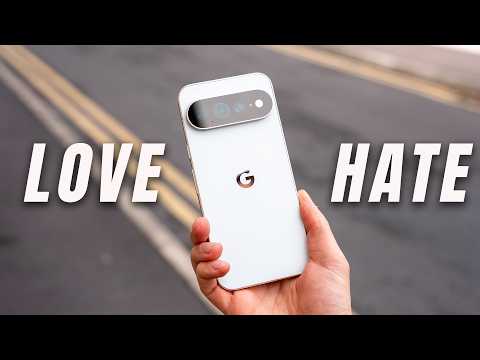
Early adopters expect a few bugs when buying a phone at launch. What they shouldn’t have to deal with is a brand-new flagship that can’t get through basic setup.
For now, the best option for affected owners appears to be contacting Google Support to request a replacement. If Google confirms that there is a broader issue, I’d expect the company to make the exchange process as straightforward as possible.
When a $1,000 flagship can turn into a brick right out of the box, waiting might be the smarter move.
As for everyone else, it may be worth holding off just a little longer before buying a Pixel 11 Pro. The phone itself may turn out to be perfectly fine, but when a new flagship can turn out completely unusable right out of the box, there’s little reason to take the risk until we know more about what’s going on.
If you’ve faced a similar issue with your Pixel 11 Pro, we’d love to hear about your experience with Google Support in the comments below.

Conversation
Read what readers said or add your take.